To ensure security compliance and audit readiness, you can set up identity access
reviews to occur at scheduled intervals. These identity access reviews are performed based on a
list of selected roles.
Before you begin
Make sure that all the required identities have been associated with the correct
roles.
What you should know
Only an Account administrator can schedule identity access reviews.
You can schedule up to five identity access reviews at a time, with up to 20 roles in
each review.
Procedure
From the homepage, click Organization
> Access reviews.
Click Schedule access review.
In the Select review type dialog, select Identity
access review.
In the Identity access review configuration dialog, enter a name
for your identity access review.
For example, "Contractor access review" for electricians or "Data center identity
access review" for your direct reports that need access to a data center.
Search for and select the Roles to include
Identity access reviews will be generated for all active and inactive identities in
that role. Inactive identities are identified in the review.
In the Schedule reviews section, select
Yearly to schedule a review.
Select the day and month that you want the identity access review scheduled.
Select a time for the
review.
Schedule your identity access reviews so that they are automatically triggered before
corporate audits or site safety checks to ensure your security compliance and audit
readiness.
You can manually start an access review by selecting the
Now schedule. Typically, manual access reviews are used to test
reviews before they are scheduled to check that all participants are properly set, or to
force a review after an incident.
All scheduled review times use the time zone of
the site.
(Optional) Add details in the Notes field.
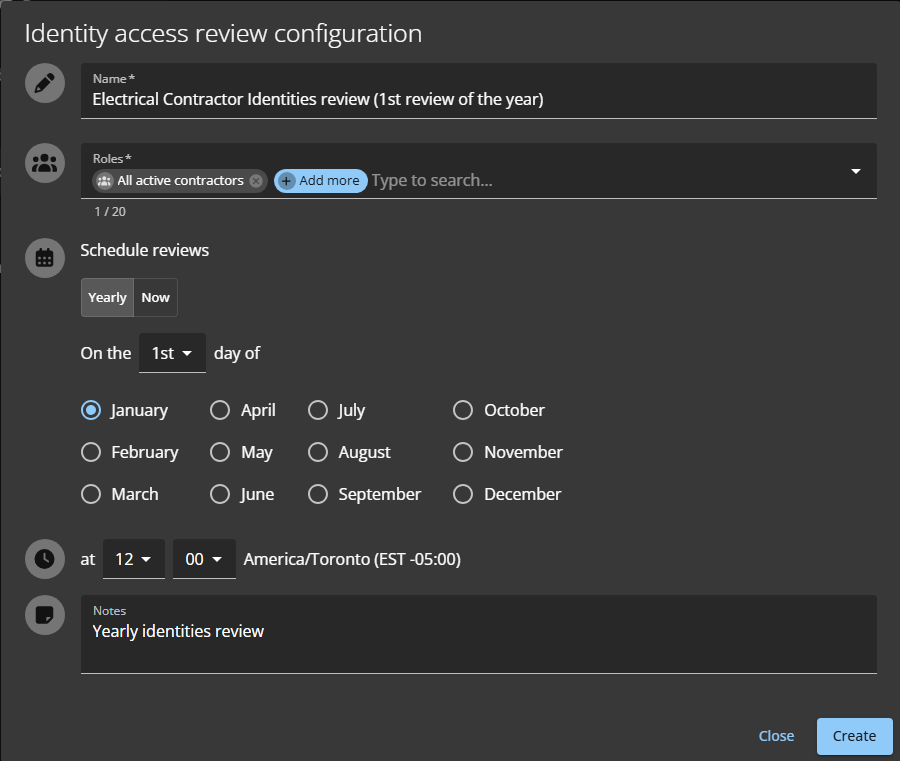
The following example shows an identity access
review for the All active contractors role, scheduled to occur
Yearly on the first day of January at 12:00.Figure 1. Identity access review (yearly access reviews)
Click Create.
(Optional) Click Download CSV and follow your browser prompts to
save a copy of the list of scheduled access reviews.
(Optional) Click an identity access review in the list to see the schedule
details.
To display all access reviews, you can click Go to access reviews
report.
Example
After you finish
When the scheduled time arrives, the designated supervisor must complete the identity
access review.