To ensure security compliance and audit readiness, Role owners can set up role access
reviews to occur at scheduled intervals. You can also start a role access review manually if
required.
Before you begin
Make sure that the roles to be reviewed have already been defined.
Procedure
From the homepage, click Organization
> Access reviews.
Click Schedule access review.
In the Select review type dialog, select Role access
review.
In the Role access review configuration dialog, enter a name for
your role access review.
Search for or select the roles to include.
(Optional) Select Enable review verification to add a
second-level review to the access review, and enter the names of your verifiers.
You can add up to 20 verifiers in the Verifiers field. Only one
verifier from the list is required to complete verification for the access review.
Select the Schedule reviews frequency that you require.
You can manually start an access review by selecting the Now
schedule. Typically, manual access reviews are used to test reviews before they are
scheduled to check that all participants are properly set, or to force a review after an
incident.
The options that are displayed vary depending on the selected
frequency.
Select when to trigger role access reviews:
Yearly
Select a day and one or more months.
Monthly
Select a day.
Weekly
Select one or more weekdays.
Select the review time.
All scheduled review times use the time zone of the site.
(Optional) In the Notes field, add more details as needed.
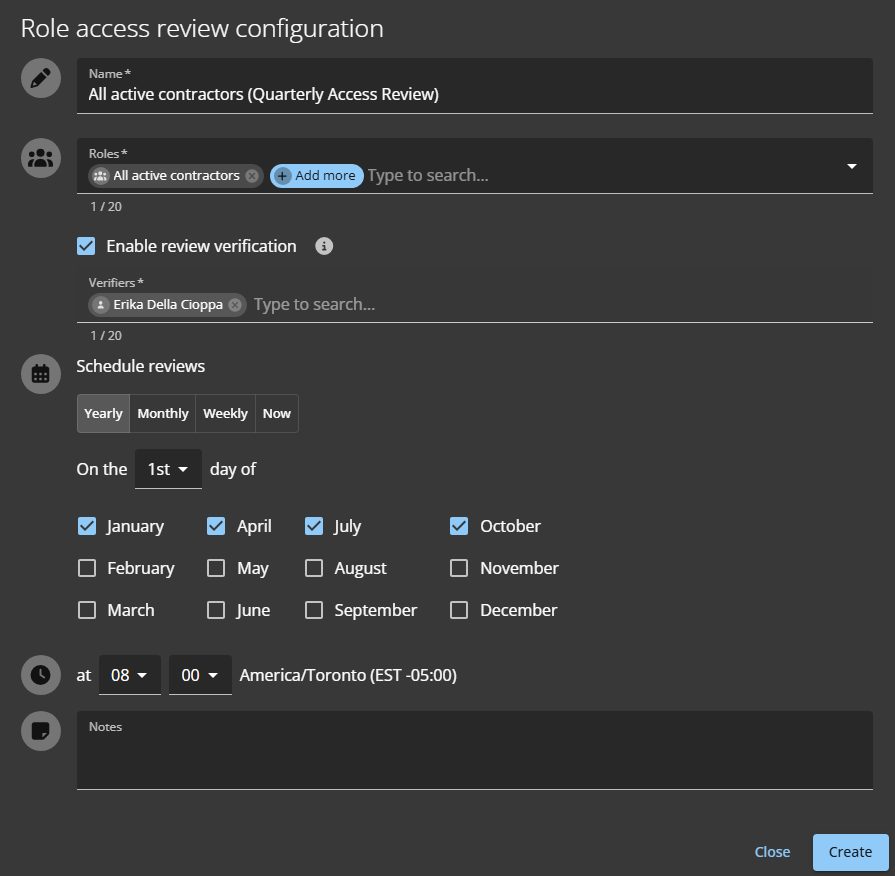
A review for the all active contractors
role, scheduled to occur Yearly at quarterly intervals on the first
day of the month at 08:00. The review requires verification.
Access reviews scheduled for Now do not appear on the Scheduled Access
reviews page. Instead, they are immediately displayed in the My
tasks view of the relevant reviewers.
Click Create.
(Optional) Click Download CSV and follow your browser prompts to
save a copy of the list of scheduled access reviews.
(Optional) Click a role access review in the list to see the schedule details.
To display all access reviews, you can click Go to access reviews
report.
After you finish
When the scheduled time arrives, the designated role manager or role owner must
complete the access review.

 Access reviews scheduled for Now do not appear on the Scheduled Access reviews page. Instead, they are immediately displayed in the My tasks view of the relevant reviewers.