2026-04-17Last updated
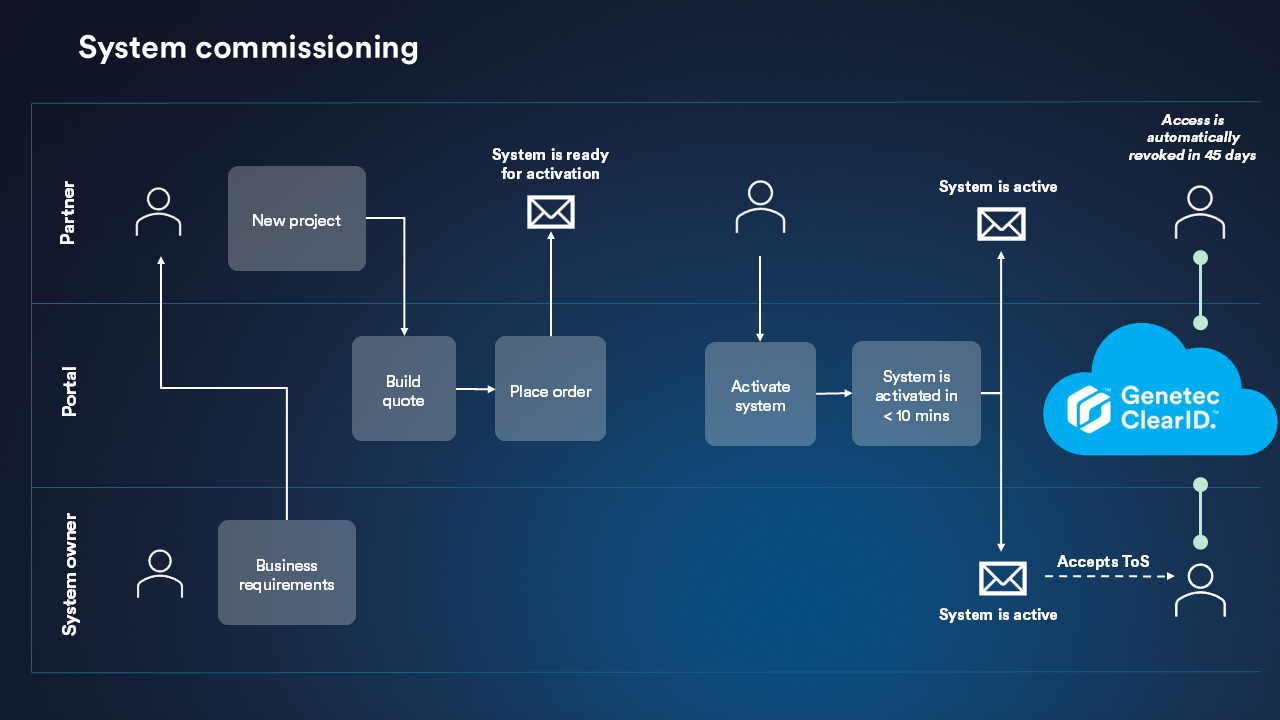
Setting up Genetec ClearID™ involves planning, ordering, and activating the
system.
What you should know
- This procedure is for channel partners or buyers.
- The ClearID plugin must be integrated with a Security Center system.
Procedure
-
Commission a new system:
-
Review the business requirements.
-
Build a quote.
-
Place an order.
- When placing an order, specify the end user system owner.
- The system owner represents the end user organization and is responsible for
accepting our Terms of Service.
- When an order is processed, the partner or buyer receives an email prompting
them to activate the system.
-
Activate the system by clicking the link in the activation email.
If, as the buyer, you aren't involved with system activation, set up an administrator:
-
Sign in to the Subscriptions Portal.
-
Click the Members tab and click Add
member.
-
Enter the member's details and select Administrator.
-
Select Send an invitation to the member now.
-
Click Add member.
If you are an assigned administrator, activate the system:
-
Sign in to the Subscriptions Portal.
-
Click the Activate button and follow the prompts.
-
Click Activate system.
After the system is activated, the system owner, typically the end user, receives an
email inviting them to sign in to the ClearID portal where they can accept the Terms of
Service.
-
Sign in to ClearID and accept our Terms of Service.
The end user system owner specified on the order must sign in and accept the Terms of
Service. If this step is not completed, assigned users can't sign in.
-
After the Terms of Service are accepted, set up your system: