To synchronize credentials across multiple Synergis™ systems, an Account administrator
must configure your credential synchronization settings in the Genetec ClearID™ portal.
For the synchronization functions to work, you must be using all the identity management
functions provided by ClearID.
Any credential changes that are only performed on a secondary system aren’t synchronized
to the other systems.
Credentials won’t be sent to systems where cardholder and credential management is in
read-only mode.
In this situation, the access control system is highlighted in the ACS list with the
Cardholder and credential management is disabled () icon.
Procedure
From the homepage, click Access management
> Administration
> Credentials.
In the Credential synchronization mode section, select a
synchronization mode:
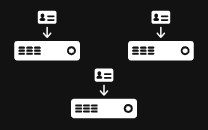
Option 1: No synchronization between access control systems.
Each access control system manages its own credentials. No synchronization
occurs.
Note:
If you select this option,
skip to the final step.
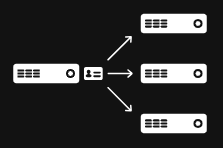
Option 2: Use a specific access control system as the source of credentials
synchronization.
Credential modifications performed in the selected access control system are
synchronized to all other systems where the identity is associated with a
cardholder.
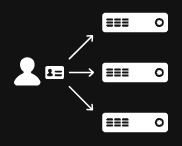
Option 3: Use the system associated with the primary site of the identity as
the source of credentials synchronization.
The system associated with the identity’s primary site is the source.
Credential changes in this system are synchronized to all other systems linked to
the
identity.
If you selected option 2, select an access control system as the source for credential
synchronization.
You must select Genetec ClearID™ system from the list when
synchronizing credentials to ClearID from external data sources using the following
synchronization tools:
Microsoft Entra ID
Cloud CSV
ClearID API
In the Credential types and formats section, select the credential
types to synchronize.
The available options depend on credential data pulled from your connected
systems.
If multiple formats exist, you can choose to synchronize only specific formats.
Selecting option 2 or 3 as your synchronization mode allows you to configure and
synchronize custom credential formats.

 ) icon.
 Note:If you select this option, skip to the final step.