
Creating exceptions to the role membership request approval workflow
2026-05-06Last updated
To bypass standard approval processes and auto-approve specific requesters such as VIPs, you can create exceptions to the role membership request approval workflow in Genetec ClearID™.
What you should know
- All role membership requests must follow the steps for approval set by the chosen request workflow.
- You can create exceptions to this approval process when certain users make role
membership requests.
- For example, you can automatically approve requests made by users who belong to a VIP or Upper Management role.
- You must be a Role owner, Role manager, or an Account administrator to set exceptions to the request approval workflow for a role.
Procedure
-
Under Request approval workflow settings, define exceptions to the
request workflow set for the role:
If the request approval workflow is set to Automatic approval, the Request approval workflow settings section is hidden.
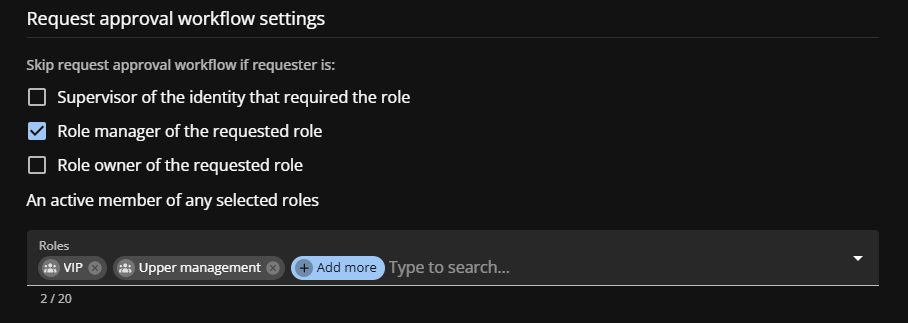
- Supervisor of the identity that required the role
- Automatically approve requests when the requester is the Supervisor of the identity that requires the role.
- Role manager of the requested role
- Automatically approve requests when the requester is the Role manager of the role.
- Role owner of the requested role
- Automatically approve requests when the requester is the Role owner of the role.
- An active member of any selected role
- Automatically approve requests when the requester is a member of a listed role.